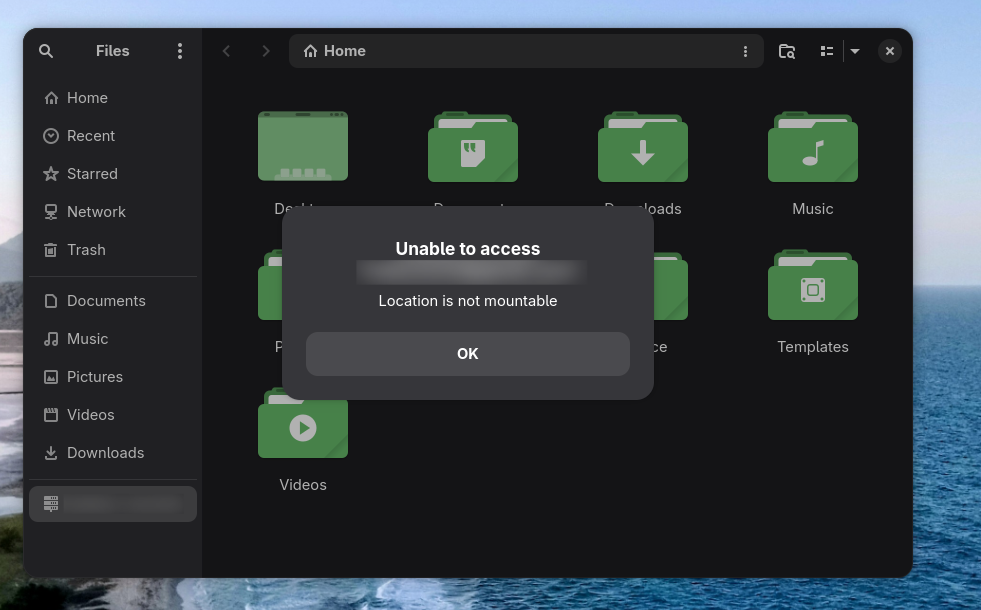
Fixing GNOME Google Drive Mounts on NixOS 25.11
How I fixed the 'Location is not mountable' error by enabling GVFS Google support and related GNOME services on NixOS 25.11.

I ran into an issue on NixOS 25.11 that took me a while to understand: Google Drive would appear in GNOME Files after signing in with GNOME Online Accounts, but trying to open it failed with:
"Location is not mountable"
This post shares the fix that worked for me and got Drive mounts working reliably on my system.
The problem
At first glance, everything looked correct:
- GNOME Online Accounts was enabled.
- I could sign in to Google.
- Drive showed up in the sidebar.
But the mount itself still failed. The missing piece was that the default GVFS build in this setup did not include Google backend support.
What I changed
I made three focused changes.
1) Force a GVFS build with Google support
I overrode the GVFS package to enable Google support explicitly:
services.gvfs.package = pkgs.gnome.gvfs.override {
  gnomeSupport = true;
  googleSupport = true;
};
Why: without this, GOA can authenticate, but GVFS cannot complete the Drive mount backend path.
2) Keep the GNOME account/mount stack enabled
I ensured these services stayed enabled:
services.gnome.gnome-online-accounts.enable = true;
services.gvfs.enable = true;
services.gnome.gnome-keyring.enable = true;
services.accounts-daemon.enable = true;
programs.dconf.enable = true;
Why: these are all part of the GNOME identity, credential, and desktop integration chain used for online volumes.
3) Allow the insecure libsoup2 package required by this backend path
I added:
nixpkgs.config.permittedInsecurePackages = [
  "libsoup-2.74.3"
];
Why: in this channel/version combination, enabling the GVFS Google backend pulls libsoup2, which is flagged insecure. This exception allows rebuild and evaluation to proceed.
Important note: this is a pragmatic compatibility workaround, not a long-term ideal from a security perspective.
From what nixpkgs currently documents, this is not about a single isolated CVE. The libsoup 2 line is end-of-life and marked with many known unfixed CVEs, so Nix surfaces it as insecure by default.
I am genuinely grateful this warning exists. It is easy to feel blocked when a rebuild stops, but this policy is doing an important job: reminding us where a compatibility fix trades off against long-term security hygiene.
Apply and verify
After updating your configuration:
sudo nixos-rebuild switch
Then:
- Open GNOME Online Accounts and confirm your Google account is connected.
- Open Files.
- Select Google Drive from the sidebar.
If everything is wired correctly, Drive should mount instead of failing with "Location is not mountable."
Tradeoffs and future direction
This fix restores native GNOME Drive mounting, but it currently depends on a package exception (libsoup-2.74.3). A cleaner long-term path is to move to a backend stack that avoids insecure dependencies, or use an alternative mounting approach such as rclone.
In other words, this got me unblocked quickly, and I appreciate that. At the same time, I treat it as temporary until the Drive backend path can run without the older EOL library line.
TL;DR
If Google Drive appears in GNOME Files but will not mount on NixOS 25.11, this is the short version of what helped me:
- Override GVFS with
googleSupport = true. - Keep GOA, GVFS, keyring, accounts-daemon, and dconf services enabled.
- Permit
libsoup-2.74.3so the build works in current channel constraints.
I am thankful to the Nix maintainers and GNOME ecosystem here: even when this path is inconvenient, the defaults push us toward safer choices.
Jhey Pi: an official landing site for an aspiring musician
Official landing site for Jhey Pi, built with Nuxt 4 and Nuxt UI to combine Spotify releases and YouTube videos into a single feed.
ChronoCal: Time tracking inside Google Calendar
A Google Calendar add-on built with Apps Script that tracks real time spent on events directly in Google Workspace—no external backend, no third-party storage, and no browser-side timer dependency.